Built for Ecommerce

Fix the things quietly costing you Google Shopping performance.

One dashboard that cleans your feed, sharpens your bids, and cuts your CPCs by ~20% - no agency, no guesswork, no juggling tools that don't talk to each other.
What's this all about?

Try it free. No signup.

Drop in any rough product title & watch the magic happen!

psst.. the real thing uses more than just the input title, so expect this to be less accurate. Still cool though..

What used to take a specialist now takes an afternoon.

Clean, enrich, deploy. All guided by by one intelligent platform.

How it works

Just 3 simple steps to get your product feed top-notch.

one

Connect in 60 seconds

Link Shopify, paste a feed URL, or upload a CSV. We pull your catalog — no risky writes back to your store.

Two

We fix missing and broken fields

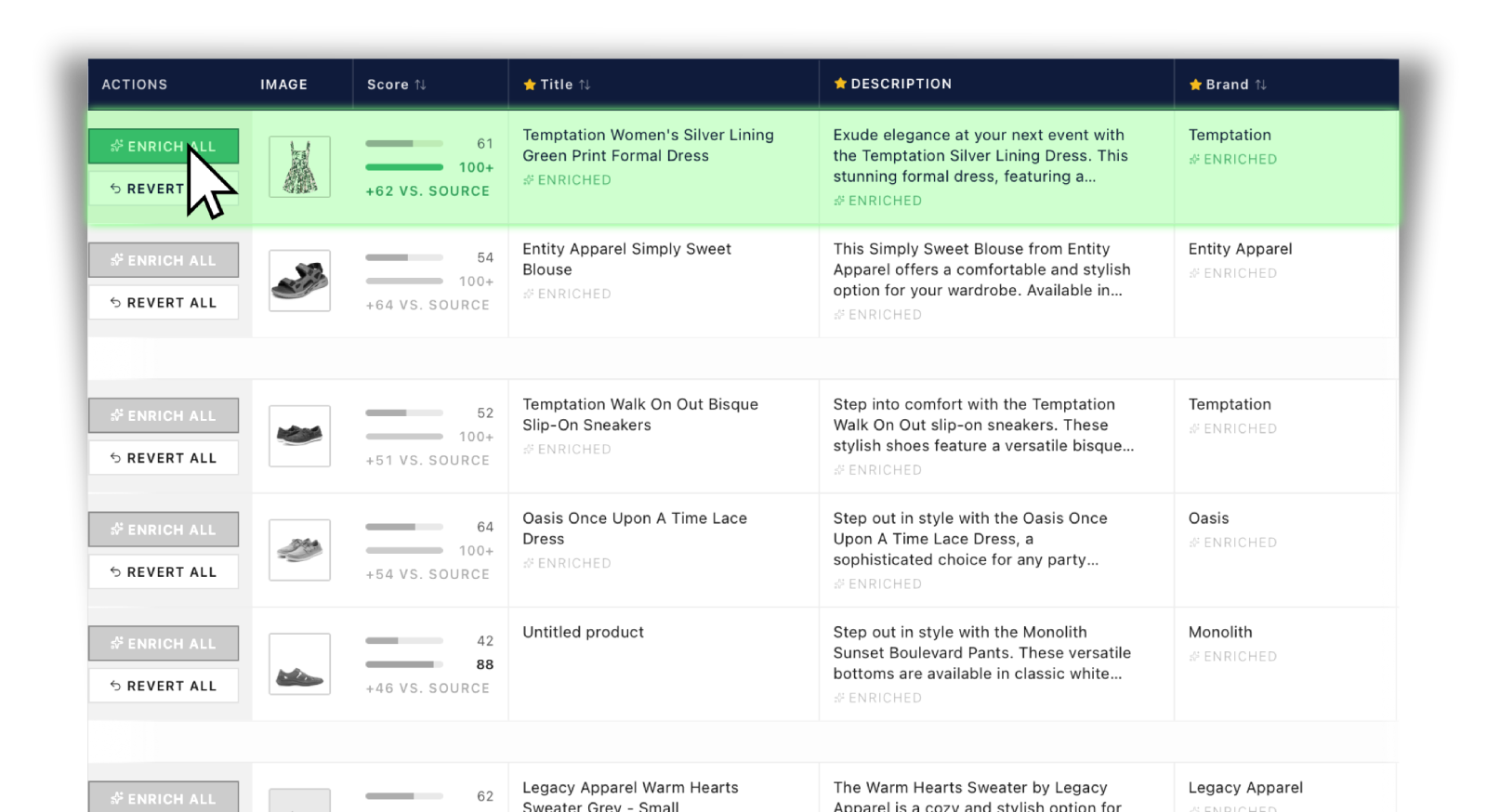
Titles, descriptions, Google categories, GTINs, brand, colour, size, gender, age group, material - written to spec, locked in, ready to ship.

Three

Google gets a feed it loves

A stable feed URL Google fetches on schedule. You stay in control - re-sync whenever you want.

Get started →

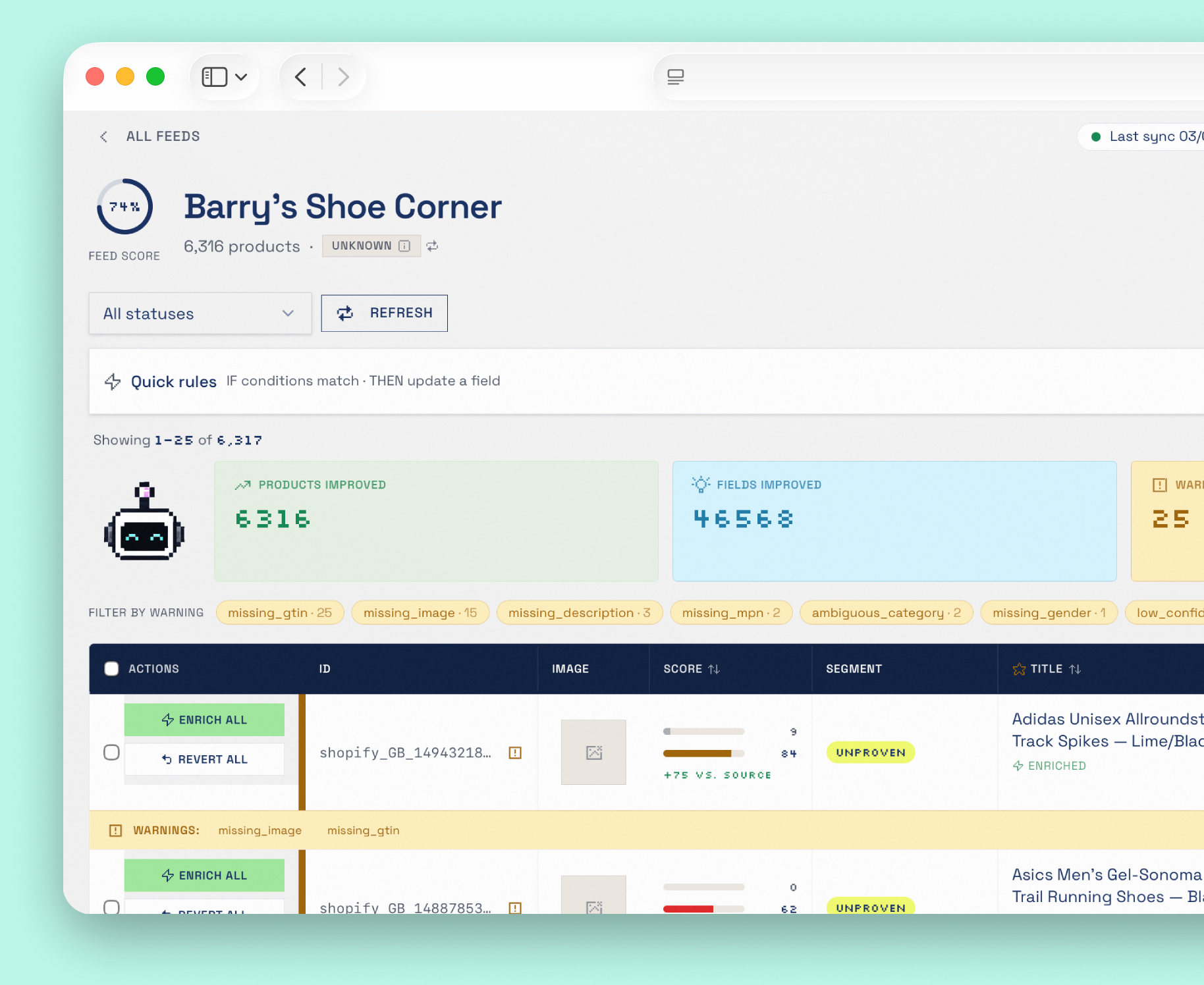
One Health Score monitors your entire feed.

0%

We create a single score using advanced analysis and weighting of Google's most important fields, including any you've missed. You can quickly see how you compare to the best, and what Optimise has done to improve your score.

What's yours?
Bidsmart analysis

Where is
your budget actually going?

BidSmart segments every product by clicks and ROAS — so you can see exactly where to scale up, cut back, and push harder.

Example analysis — 21,368 product catalogue
60% 45% 30% 15% 0%
Winners — 18%3,846 products
High clicks, high ROAS
Budget share: 6%
6% of budget
Losers — 31%6,624 products
High clicks, low ROAS
Budget share: 60%
60% of budget
Hidden gems — 12%2,564 products
Low clicks, high ROAS
Budget share: 3%
3% of budget
Unproven — 39%8,334 products
Low clicks, low ROAS
Budget share: 31%
31% of budget
WinnersScale up
LosersCut or fix
Hidden gemsPush harder
UnprovenTest or ignore
BidSmart recommendations
Winners · 3,846 products Just now
Increase tROAS target by 29% — current bidding is under-capturing high-converting inventory
↑ £4,200 est. monthly revenue
Losers · 6,624 products Just now
Reduce bids by avg. 41% across high-click, low-ROAS products to stop budget drain
↓ £1,850 wasted spend recovered
Hidden gems · 2,564 products Just now
Raise bids by avg. 55% to expose high-ROAS products to more traffic
↑ Est. 3.1× more impressions

* Example analysis only. Figures are illustrative. Your BidSmart analysis reflects your store's live Google Ads and Merchant Center data.

Connects with your stack

Your actions. Contextualised by data.

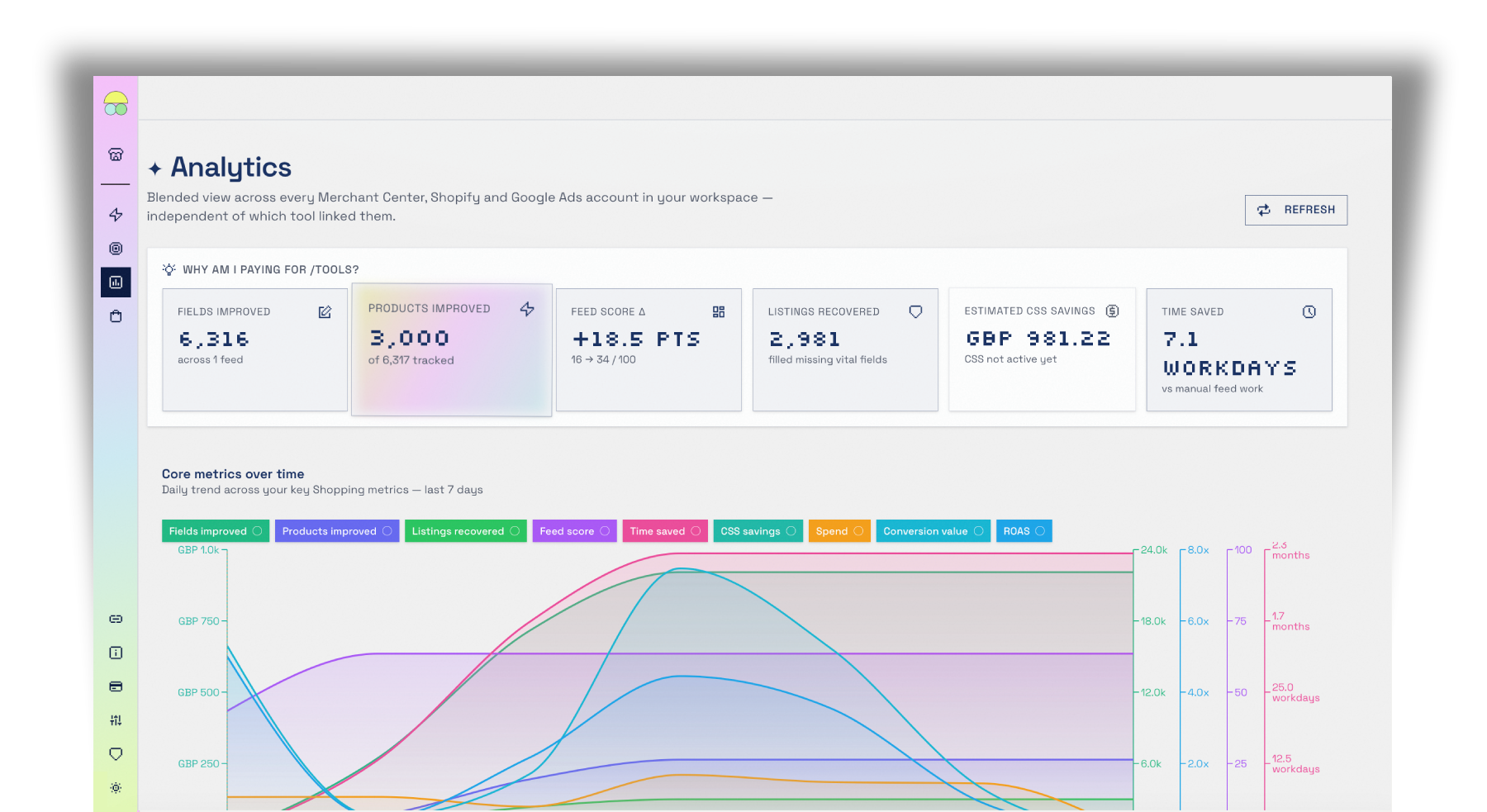
Stop being forced to rely on a hunch. See how actions impacted performance and get a clear view of growth over time.

Built-in CSS

Same placements, same clicks. ~20% savings.

Google takes a margin on every Shopping click run through its own Comparison Shopping Service. /tools lets EU & UK stores switch to our third-party CSS (if you want) - so you keep the exact same ad spots and traffic, and pay around 20% less for each click. No agency, no setup, no catch.

Your cost
−20%
How we compare

We'll let the features do the talking.

A full comparison across setup, enrichment, bidding intelligence, CSS savings, analytics and pricing. No asterisks, no hidden tiers.

Feature Merchant CenterNative OthersDataFeedWatch, Channable, WakeupData ✦ /toolsReliable People
Getting Started
Setup time to first live feed Hours–days 30–60 mins Approx 5 minutes
No store changes required Sometimes Never — no writes back to your store
Shopify native connection Basic
WooCommerce / Magento / BigCommerce Via feed URL Via feed URL or CSV — no native connector required
Feed URL / CSV ingestion
Multiple feeds per account Limited Up to 5 feeds
Multi-country / multi-language feeds 48+ countries supported
Product catalogue size limit Platform limits apply Plan-dependent No limit (fair usage)
Feed Enrichment & Data Quality
AI-powered field enrichment AI
Fields enriched automatically Up to 20 fields per product
AI model trainable by merchant Book training sessions with the AI to actively improve data accuracy
AI trained on sector-relevant data only Clothing stores learn from clothing stores — not generic boilerplate
Titles optimised for search intent Manual only AI-rewritten
Descriptions enriched Manual only AI-rewritten
Google product category auto-assigned Rule-based AI-assigned
GTIN / MPN auto-populated
Variant relationship builder (item_group_id) Manual rules only Auto-detects & bonds colour/size variants into one product family — constellation + list viewsEXCLUSIVE
Before/after score comparison per product See exact improvement per item
Revert enrichment per product Full control, nothing permanent
Rules & Control
IF/THEN bulk field editing rules
Global rules across all products Limited
Auto-enrichment on every sync Toggle on/off per feed
Manual enrichment trigger
Feed Health & Scoring
Per-product quality score 0–100 score per product
Feed-level aggregate score Basic diagnostics Limited Clear 0–100 feed score
Listings recovered (missing fields filled) Partial Avg. 82% of products improved
Merchant Center warnings surfaced In MC only Surfaced inside /tools
Flagged products view In MC only Limited All flagged products in one view
Sync & Hosting
Hosted Merchant Center-ready feed URL N/A (native) CSV + XML endpoints
Daily auto-sync
Manual sync on demand Varies One click
Sync history & audit trail Limited Limited Full timestamped history
CSS — Cost Reduction
Google CSS default (~20% per click) Default Default Replaced
Third-party CSS partner switching Built in
~20% CPC saving on Shopping ads Same placements, lower cost
CSS activation in-app (no agency needed) Request with one click
CSS eligibility requirements N/A N/A All paying users — no minimum spend
Bidding Intelligence
Product-level bid recommendations BidSmart — recommended from £500/month Google Ads spend
Deep per-product tROAS analysis Portfolio-level only Individual product tROAS scoring and analysis
Bid adjustment recommendations (+ / −) Increase or reduce bids per product based on performance data
Custom label segmentation for bidding Segment by performance tier for granular bid control
ROAS / CPA target per product segment Set targets at segment level, not just campaign level
New / thin-data product incubation Product Incubator — a controlled-budget pen where new products prove themselves before graduating into your segmentsEXCLUSIVE
Apply recommendations (you stay in control) Nothing changes until you approve — full merchant control
Analytics & Reporting
Merchant Center performance data In MC only Limited Pulled into /tools
Google Ads performance data In Ads only Pulled into /tools
Shopify revenue data
Blended cross-platform analytics view All in one dashboard
Seasonality insight by brand / category See seasonal demand & ROAS patterns by brand — time your bids and budget for the peaksEXCLUSIVE
ROI dashboard ("what has /tools done for you")
Time saved metric Calculated vs manual effort
Date range filtering Limited 7 / 14 / 30 / 60 / 90 / 180 days
Activity log (syncs, enrichment, connections) Full timestamped history
Support
Support channels Help centre only Ticketing Support ticketing
Typical response time Days 1–3 business days Within 1 business day
Pricing
Cost to get started Free £50–£500/month flat 14-day free trial*
Pricing model Free Flat fee (pay whether it works or not) 1.9% of Google-attributed sales — capped at £1,499/month
Minimum monthly charge up to £150 £229 £89/month
Scales with your revenue ✗ Fixed cost You only pay more when you earn more
Cancel any time Varies

Saves the average user 130+ hours in their first monthNo more manually fixing titles, hunting for missing GTINs, or second-guessing Google categories.

Make your Google Shopping budget go 20% further/tools is the only feed tool that also cuts your CPCs. Built-in CSS switching means you keep the same placements, pay less per click — and most merchants recover the entire cost of /tools from that saving alone, before a single feed improvement is counted.

AI that learns your industry, not just your catalogueUnlike generic enrichment tools, /tools trains its AI on data from stores in your sector — so a clothing retailer benefits from enrichment informed by other clothing retailers, not irrelevant product types. You can also book direct training sessions with the AI to actively improve data accuracy over time.

* Trial requires a valid payment method. Cancel before day 14 and you will not be charged.

Ready to boost your sales?

Start your trial →
FAQs

Frequently asked questions

Everything about /tools — connecting your product feed, AI enrichment, the feed Health Score, built-in CSS savings, BidSmart bidding, pricing and data security. Can't find your answer? Our support team replies within one business day.

Getting started
What is /tools and how does it improve my Google Shopping feed?
/tools is a Google Shopping optimisation platform for ecommerce merchants. It connects to your product feed, uses AI to enrich over 20 fields per product (titles, descriptions, GTINs, Google product categories, colour, size and more), scores your feed health, cuts your CPCs with built-in CSS, and gives you product-level bid recommendations through BidSmart — all from one dashboard.
Which ecommerce platforms and feeds does /tools connect to?
/tools has a native Shopify connection and connects to Google Merchant Center and Google Ads via secure sign-in. WooCommerce, Magento, BigCommerce, WordPress and custom stores connect via a feed URL or CSV upload — no plugin or connector required. You can run multi-country and multi-language feeds across 48+ countries.
How long does it take to set up?
Around five minutes. You connect your store or product feed, /tools enriches your products, and you get a Merchant Center-ready feed URL (CSV and XML endpoints) to drop into Google Merchant Center. Most merchants are live on their first optimised feed the same day.
Do I need to install anything or change my store?
No. /tools never writes back to your Shopify store or source platform feed. Enrichment is non-destructive — improvements are written to a separate supplemental layer and served in your output feed, so your original product data is always preserved and you can revert any change.
Can I manage multiple stores and feeds?
Yes. You can run up to 5 product feeds per account (only one whilst on the Trial) and manage multiple stores under one login, each with its own connections, enrichment and analytics.
Feed enrichment & data quality
What does AI product feed enrichment actually do?
It fills in and improves up to 20 product fields automatically: rewriting product titles for search intent, cleaning descriptions, assigning the correct Google product category, normalising colour and size, inferring gender and age group, and populating missing GTINs and MPNs — the attributes Google Shopping uses to match and rank your products.
Will enrichment overwrite my original product data?
Never. Enriched values sit in a supplemental layer on top of your source feed, so nothing in your store is changed. You can compare the before/after for every product and revert enrichment per item at any time.
Can /tools fix missing GTINs and Google product categories?
Yes. /tools auto-populates GTIN and MPN where it can and assigns the most accurate Google product category for each item — two of the most common causes of weak Shopping performance and product disapprovals.
What is the feed Health Score?
A single 0–100 score for your whole feed, plus a score for every product. It shows exactly what's dragging your feed down and how many listings have been recovered by filling missing fields — on average around 82% of products are improved.
Does /tools help prevent Merchant Center product disapprovals?
Yes. /tools surfaces Merchant Center warnings inside the app, fills the missing required fields that cause disapprovals, and gives you a single view of every flagged product so you can fix issues before they cost you impressions.
What is the Relationship Builder?
It automatically detects colour and size variants of the same product and bonds them together under one item_group_id, so Google treats them as a single product family. You review the suggested groupings in a visual builder and confirm them in a click.
Is the AI trained on my type of store?
Yes — enrichment draws on data from stores in your sector, so a clothing retailer benefits from learning informed by other clothing retailers rather than generic boilerplate. You can also run training sessions to actively improve accuracy on your catalogue over time.
CSS & cost savings
What is CSS and how does it save ~20% on Google Shopping?
CSS stands for Comparison Shopping Service. Google takes a margin on every Shopping click run through its own CSS. /tools switches you to a third-party CSS, so you keep the exact same ad placements and traffic but pay around 20% less per click. Most merchants recover the entire cost of /tools from this CPC saving alone.
Do I need an agency to switch CSS?
No. CSS activation is built in — you request it with one click inside /tools and we handle the switch. It's included for every paying subscriber with no minimum ad spend and no agency fees.
Will switching CSS change my placements or rankings?
No. Your Shopping ads appear in exactly the same places, with the same products and the same traffic. The only thing that changes is the cost per click, which drops by roughly 20%.
BidSmart & bidding
What is BidSmart?
BidSmart is product-level bid intelligence for Google Shopping. It runs per-product tROAS analysis, shows where your ad budget is actually going, and recommends bid increases or decreases for individual products and performance segments — the granular control campaign-level bidding can't give you.
Does BidSmart change my bids automatically?
No. BidSmart is approval-first: nothing is ever pushed to Google Ads until you review and sign off on it. You stay fully in control of every change.
What is the Product Incubator?
It's a controlled-budget pen for new and thin-data products. Instead of being drowned out by your proven sellers, promising new products get a fair, capped budget to prove themselves, then graduate into your normal bidding segments once they perform.
Is there a minimum Google Ads spend to use BidSmart?
BidSmart is most useful — and recommended — once you're spending around £500 a month or more on Google Ads, where there's enough product-level data for reliable tROAS analysis and bid recommendations.
Pricing & billing
How much does /tools cost?
/tools is performance-based: 1.9% of your Google-attributed sales, capped at £1,499/month, with a £229£89/month minimum. There's a 14-day free trial so you can see the results before you pay.
How does performance-based pricing work?
You pay a small percentage of the sales Google attributes to your Shopping activity, so your cost scales with your results — you only pay more when you earn more — and it's capped at £1,499/month no matter how large you grow. Most merchants offset the fee with the CSS saving alone.
Is there a free trial, and do I need a card?
Yes — a 14-day free trial. A valid payment method is required to start, but you won't be charged if you cancel before day 14.
Can I cancel any time?
Yes. There's no lock-in — you can cancel your subscription at any time.
Connections & data security
How does /tools connect to Google Ads and Merchant Center?
Through Google's secure sign-in (OAuth). You authorise the connection in a few clicks, and /tools pulls your Merchant Center and Google Ads performance data into the dashboard alongside your Shopify revenue for a blended view.
Is my data safe, and does /tools change anything in my store?
/tools never writes back to your store or source feed — connections are read-only for your product data, and all changes happen in your /tools feed layer. BidSmart changes to Google Ads only ever happen with your explicit approval, so you remain in control of your store and your ad account.
Support
What support do you offer?
Every plan includes support ticketing inside /tools, with a typical response time within one business day.